Inspect & find metadata
Open a file from the source panel or drag it into the workspace. Browse grouped tags and use the search field to quickly find a name or value. Scroll the table with the mouse wheel.

View, edit and transfer file metadata in a focused Windows workspace.
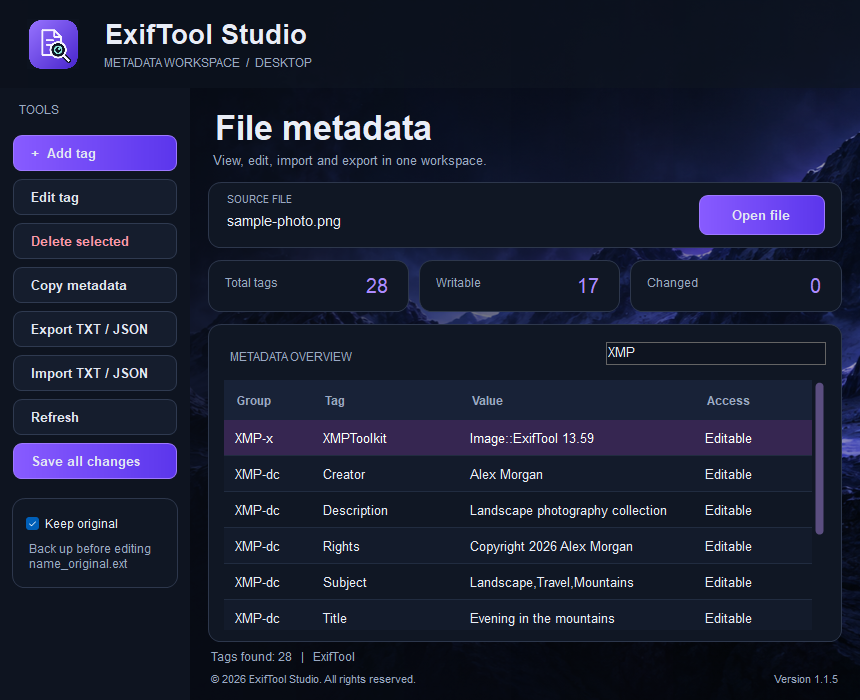
ExifTool Studio brings metadata inspection and editing into a compact desktop application. Explore the tags stored in your files, update compatible fields and move useful metadata between files without working with command-line tools.
The dark workspace keeps the source file, searchable tag table and editing tools together. Clear access labels distinguish writable fields, while live counters show total tags, writable tags and tags changed since you opened the file.
Files are processed locally on your PC. Your media is not uploaded to the store for metadata editing. The application includes its ExifTool engine, so you do not need to install Python or configure a separate command-line tool.
Open a file from the source panel or drag it into the workspace. Browse grouped tags and use the search field to quickly find a name or value. Scroll the table with the mouse wheel.
Add, edit or remove supported writable tags. Read-only fields are identified in the table. Available tags and write support depend on the file format and the metadata structure.
Export metadata as a readable TXT report or JSON data. Import compatible TXT or JSON metadata into the open file. Unsupported or read-only fields are skipped or reported rather than treated as editable values.
Choose a source and destination to transfer compatible metadata. The destination opens in the workspace after copying, so you can adjust individual fields before saving your final result.
See how many tags are present, how many are writable and how many have changed from the initial baseline. The Changed counter updates after tag changes and metadata transfer.
Enable Keep original to preserve a backup before editing. Backups keep the real file extension: photo.jpg becomes photo_original.jpg. The original backup is preserved when you make further edits.
Save all changes opens a destination dialog for the edited file. Choose its folder and name while retaining the source format, then continue working with the saved copy.
The English-language workspace combines a compact window, keyboard shortcuts, a searchable table and a shared visual style with the store. Metadata processing runs locally.
Click Open file inside the Source file panel, use Ctrl+O or drag a supported file into the window. Review the metadata and writable fields.
Edit individual tags, import a compatible metadata report or copy metadata from a second file. After a transfer, adjust any destination fields you need to change.
Tag edits and imports write to the open file. Enable Keep original before making changes. To save the resulting file to a chosen location, click Save all changes.
$11 USD buys a PERPETUAL license: one payment, with no time expiry, for one registered user account and one PC.
Version 1.2.1 supports account-linked activation. Enter your activation key in the app. Replacing a PC requires a device reset by support.
First activation requires a connection. A signed offline lease allows up to 24 hours after the last successful check, never beyond a TIME license expiry. Revocation takes effect on the next online check or when the offline lease expires.
Pay with USDC on Ethereum (ERC-20). Your license and protected download are issued after full payment confirmation. Public checkout availability is shown above.
More about licenses and paymentsVersion 1.2.1 connects activation and license checks to the Cloudflare store. Version 1.2.0 adds account-linked activation on one PC, signed license checks and encrypted local activation storage. It supports protected downloads from your account and signed offline access for up to 24 hours. The existing metadata editing, transfer, import and export tools are retained.
Metadata editing changes supported descriptive fields and metadata structures, rather than intentionally editing the image pixels. Some fields affect how another application displays a file. Keep an original backup and verify the result in your intended viewer.
No. Write support depends on the file format and tag. System properties, calculated fields and other read-only values cannot be changed as ordinary metadata tags.
Editing a tag writes the change to the open file. Save all changes lets you choose a location and filename for a finished copy. Keep original preserves the first backup with a normal, readable file extension.
No. Metadata processing takes place locally on your PC. The planned account and licensing service is separate from processing the contents of your files.
A paid license and protected download appear in your account after full payment confirmation. Public checkout availability is shown on this page. The perpetual license costs $11 USD for one account and one PC.